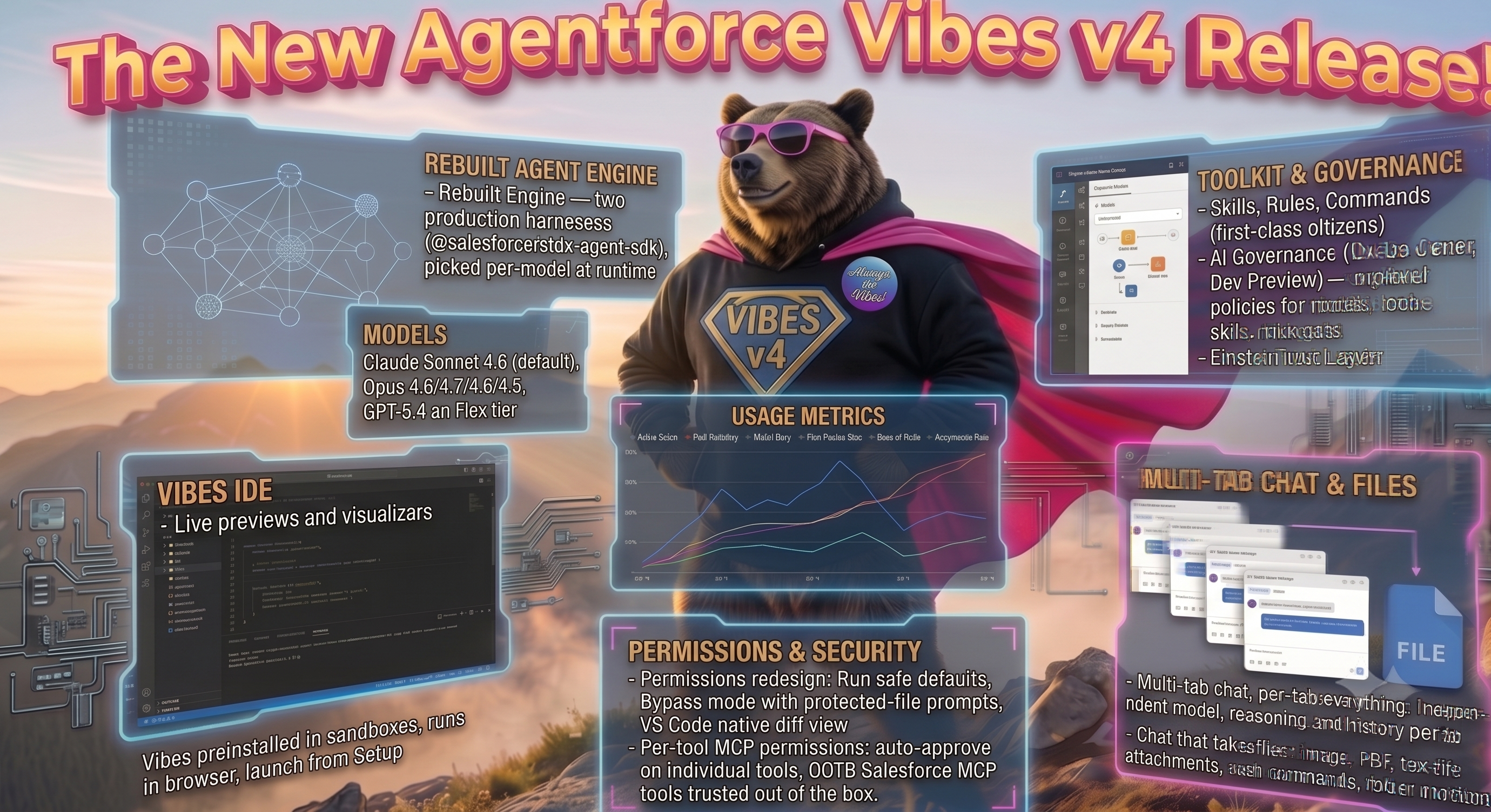
What's new in Agentforce Vibes

What’s new in Agentforce Vibes
For the past several months, we’ve been running a separate preview extension called Agentforce Vibes 2.0 so early adopters could try out the next-generation agentic experience without disrupting the extension they used every day.
The Agentforce Vibes 2.0 preview extension is now retired, and we rolled the preview features into the main Agentforce Vibes extension you probably already have installed.
Here’s how to make sure you are on the latest version of Agentforce Vibes to get these new features: sfdc.co/get-latest-vibes
Here’s what v4 delivers.
The agent engine, rebuilt
The single biggest change in v4 is what runs the agent loop, and it’s worth understanding even if you never look at a line of code.
This new version hands the loop to two production agent harnesses from @salesforce/sfdx-agent-sdk, and the extension picks the right one per model at runtime.
No vendor lock-in
There’s quite a bit of angst right now about vendor lock-in with AI tools. If your company can’t use a specific model provider, that’s not the end of the road for Agentforce Vibes. Switch the provider in the picker. Anthropic under review this quarter? Use GPT. OpenAI blocked in your region? Use Claude. New corporate policy about which providers are approved for enterprise data? Pick from what’s approved, in the same tool, without changing your workflow, your skills, your MCP servers, or retraining your team.
You don’t have to switch tools when your provider posture changes. You switch the model from the dropdown.
If you love the Claude Agent SDK, you’re already using it
Vibes is using the same Claude Agent SDK that powers Claude Code. When you pick a Claude model in Agentforce Vibes, that’s the harness driving the turn. Real Anthropic SDK, real tool-use protocol, real multi-turn chat session. Not a translation layer or wrapper pretending to be Claude. The Claude experience developers already know, wired into your Salesforce workflow.
The Mastra harness is an open-source agent framework that Vibes runs as the default for non-Claude models (GPT-5.4 and whatever else lands in the picker over time). Open source means the plumbing is auditable and when Mastra ships an improvement, we inherit it.
Both harnesses come from @salesforce/sfdx-agent-sdk. The extension picks the right one per model at runtime. You don’t pick. You don’t configure. You use the model.
Models
On the Flex tier, the model picker gives you Claude Sonnet 4.6 (the default), Claude Opus 4.8, 4.7, 4.6, and 4.5, and GPT-5.4. The composer shows your billing entitlement as an icon, and the tier name (Flex Credits, Unmetered) appears in the model picker menu, so you know what you’re spending on before you spend it.
Geo-aware model routing: when the setting is on in your org, the model picker only lists models served in your org’s region. No more picking a model that gets rejected because it doesn’t route to your geo.
For customers concerned about data residency, sovereignty, or compliance, this is the switch that makes the rollout possible. EU customers under GDPR, UK, Germany, Australia, Canada, India, and any org bound to keep prompts inside a specific region can enforce that at the org level. Developers can’t accidentally route around it. Security and legal teams get the guarantee: prompts from this org only reach models served in its region. That’s the difference between “we trust our devs to pick the right model” and “we can prove it in an audit.”
For customers in regulated industries (finance, healthcare, pharma, defense) or on Gov Cloud / FedRAMP environments, the picker only surfaces models that meet the environment’s requirements, so no one gets offered a commercial-only model that would fail on send.
For everyone else, the practical benefit is lower latency (models served in your region round-trip faster, and that adds up across multi-step tool use) and no more trial-and-error picking a model that quietly gets rejected. You pick from what will actually work for your org.
Skills, Rules, and Commands
Skills, rules, and commands live in the Toolkit alongside each other as first-class citizens.
Agentforce Vibes ships with over 100 Salesforce-provided and vetted skills for development on the platform. These skills are continuously monitored and evaluated to make sure they deliver the guidance and functions the platform teams specify. With Vibes, you get updates and new skill releases automatically. You’ll always have the latest and greatest skills for building on the platform, no manual install, no waiting on the next major version.
The Salesforce-provided skills are marked read-only. Your own custom skills stay fully editable. Multi-file skills with references/ or assets/ load completely across all supported models.
The agent does skill-first discovery for UI and media prompts. Ask it to build a React app that shows Account data, it loads building-ui-bundle-app before it acts. Ask for a CMS banner image, it loads searching-media. Routine one-shot MCP calls (a single SOQL query, a single deploy) still go direct.
Commands are explicitly named workflows you write yourself. Drop a .md file into your commands directory, give it a name, and invoke it with /name in chat. Same shape as skills, but you decide when they fire. You write a command when there’s a task you do the same way every time and you’re tired of re-typing the prompt. The value shows up over the course of a week. A ten-line prompt you write four times a day is forty minutes of re-typing (and re-remembering) you get back.
AGENTS.md support in rules means you can clarify agent behavior and expectations in the file people already know about.
AI Governance from DevOps Center
Currently in Dev Preview, Agentforce Vibes enforces AI governance policies from DevOps Center. Your admin defines the policy in the Governance org (which models are approved, which tools and skills are allowed, which risk gates apply). Every agent session picks it up automatically. No developer opt-in, no way to route around it, no “I’ll just turn that setting off for this one prompt.”
If you’re one of the customers that told us “we can’t roll this out until we have governance,” this is the release that unblocks you.
Einstein Trust Layer
Every request Agentforce Vibes makes goes through the Einstein Trust Layer, the same secure architecture that fronts the rest of Agentforce. It’s the reason enterprises can hand this tool to their developers without a six-month security review.
What that actually means for you:
Zero data retention with model providers. Salesforce’s contracts with third-party LLM partners prohibit them from retaining prompts or completions, and from training on your data. When your agent sends a request, the model sees it, responds, and forgets it. Nothing sits on someone else’s disk.
Dynamic grounding with your org’s data. Prompts get enriched with real, current CRM context before they hit the model, so answers reference what’s actually in your org, not what the model guessed a Salesforce org probably looks like. This is what MCP servers like Metadata Grounding plug into.
Data masking for sensitive fields. PII gets masked out of prompts before they leave Salesforce. The specific masking rules depend on the workflow and the data classification configured in your org, but the default posture is that sensitive fields don’t cross the boundary in the clear.
Toxicity detection on both sides. Incoming prompts and outgoing model responses both get scanned for harmful, biased, or inappropriate language. If something’s flagged, it’s blocked before it reaches your chat window or the model.
For developers, this is mostly invisible. You send a prompt, you get a response. For the people who had to sign off on rolling agentic AI out to a Salesforce dev team, this is the paperwork already being done.
Usage metrics, org-wide and per-user
You can answer the question “is this thing actually being used, and by whom, and how much?” without asking around.
Org-level metrics give admins and leadership the top-down view: how many active users on Agentforce Vibes this week, how many chat sessions, which models are getting picked, how many Flex Credits the org has burned this billing period versus its allocation, and how much code the agent has generated across the team. If you’re rolling this out to 200 developers and finance wants to know whether the Flex tier is holding up or you need to move to Unmetered, the numbers are there.
Per-user metrics show individual actions: chats started, tool calls made, lines of code generated, models used, and their personal acceptance rate on agent-produced edits.
For teams evaluating whether to expand a rollout, this replaces the “we think people like it?” conversation with actual numbers. For finance, it turns the AI budget from a black box into a chart.
Live previews and visualizers
LWC and metadata previews for the components and metadata you’re editing. React UI bundle previews work if you’ve got the Salesforce Live Preview extension installed and Multi-Framework enabled on your org.
Agent Visualizer and Flow Visualizer view Agent and Flow metadata directly in the IDE. Requires the Metadata Visualizer extension, which ships in the Salesforce Expanded Extension Pack. No jumping to a browser tab to see what a flow looks like.
Vibes preinstalled in sandboxes. Open your browser and go.
Agentforce Vibes IDE is the same Vibes extension that runs in your browser, available in your sandbox org today. Nothing to download, nothing to configure. Same chat, same skills, same MCP, same permissions.
Everything’s already there: Salesforce Extensions, Salesforce CLI, and GitHub integration. Launch it from your org’s Setup menu and you’re authenticated and connected on the first click. Your org’s metadata loads into an SFDX project automatically. Zero setup between “I want to try this” and “I’m building.”
Permissions, redesigned
Fresh installs land on Run safe defaults. In-workspace file edits go through without asking. Anything else prompts.
Bypass mode exists for people who know what they’re doing, and it still prompts for the protected-file and .git/ cases. When it does, you get an inline alert explaining why, not a silent block or a confusing toast.
Every agent edit goes through VS Code’s native diff view. Not a homegrown viewer. The same diff experience you already use.
Multi-tab chat, per-tab everything
Open as many chat tabs as you want. Each one keeps its own model, its own reasoning trail, and its own conversation history. Switch the model in tab A and tab B doesn’t blink.
The composer shows you what tier you’re on (Flex Credits or Unmetered) and which entitlement your org has. Type a message, change your mind about the model, switch: your unsent text stays put.
A live Working/Thinking indicator tells you when the agent is actually doing something versus waiting on you. Reasoning is visible when the model exposes it. Tool calls show up as their own blocks with status, not buried in chat prose.
Per-tool MCP permissions
Auto-approve overrides work on individual tools, not just servers. Trusted read-only OOTB Salesforce MCP tools (Salesforce DX, API Context, Metadata Experts) auto-approve in Run safe defaults out of the box, with zero manual configuration. No JSON to edit, no server IDs to hand-copy, no per-tool checkboxes to hunt through. Install the extension, sign in, and the tools that should just work, just work. Each tool’s effective state is visible in the Toolkit if you want to see what’s about to run without approval, and you can override any of it, but the default is already the sane one.
Chat that takes files
Images. Paste, drag-and-drop, or attach button. PNG and JPEG. Thumbnails survive reloads, so “describe this” still works after a restart. The per-conversation budget is 10 images or 15 MB, whichever hits first.
PDFs and text files. Attach PDFs, DOCX, source files (.cls), logs, whatever. PDFs get extracted to text. Attachments survive window reloads and follow-up turns, so “summarize the PDF I sent” still works after resuming a session tomorrow.
Slash commands. Type / in the composer. You get a menu of your saved commands and skills. Pick one, it drops a /name chip into your message that expands into the saved prompt when you send. Reuse a prompt without hunting for the paste buffer.
Folder mentions. Mention a folder, the extension inlines the contents of at most 50 files and lists the full tree separately. Large folders can’t overwhelm a single turn.
What’s next
Dreamforce is right around the corner, and we’ve got a lot in flight that you’ll see there first. New models, deeper integrations across the Agentforce platform, more OOTB MCP servers, and the next wave of governance work.